It’s nice that many of the major mail providers give you the ability to report a message you’ve received as spam … but some of them make it far TOO easy to report something as spam.
I’ve noticed that many of the big names put the “Report as spam” button way too close to the delete button.
Let’s take a look at some of the providers …
First is GMail … one of the most popular (and, at least in my opinion, most powerful) free email providers around. Notice where the “Report spam” button is?
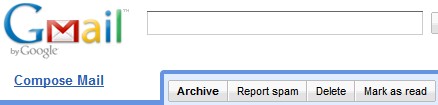
A few pixels to the left and that message you meant to delete is now considered spam.
Next is AOL …
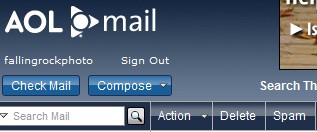
Again, if you’re off by a little bit you’ve reported a message you wanted to discard as spam.
Hotmail is just as bad …
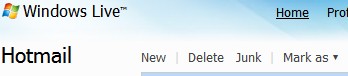
Yahoo is a LITTLE bit better …
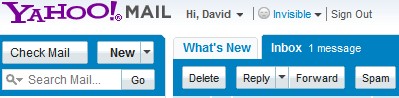
… but not by a whole lot. There is significant separation between the spam button and other buttons, but it’s still pretty easy to accidentally click the wrong button.
One thing that AOL, Gmail, and Yahoo have in common is the fact that they don’t ask for confirmation when you are reporting a message as spam.
Hotmail does ask you to confirm your spam report:

By and large, I’m sure the number of false positive spam reports are relatively small relative to the spam that is received … but the spam reports are used to evaluate future email sent to a person … so those false positive reports end up hurting legitimate mail senders (like midrange.com).
Personally, I appreciate the steps the mail providers are taking to combat spam, but I think they need to be a bit more responsible about it and take proactive steps to avoid false positives.
I couldn’t agree more. I’ve been flagged as a spammer several times and it is always a painful process to get that undone. You are assumed to be guilty based on someone who’s having a bad day hitting the wrong button (or hitting the right one not really understanding the email they’ve just received). It is a very frustrating problem. On our emails, we always include an opt out process and, if they would just go down that road, they will find a positive response letting them know that their unsubscribe request has been processed.
Rich: As a responsible vendor (which I know you are) … you also need to make sure that anyone you send mail to actually wants to receive what you are sending.
This is why my mailing lists are all using a closed loop confirmation system … after you subscribe you need to confirm that you wanted to subscribe before your subscription will be activated.
As the sys admin at a smaller ISP I can say with absolute certainty that the “report as spam” feature of AOL and other big names are seriously impacting the flow of legitimate mail. AOL users are the worst, Yahoo isn’t far behind. Yahoo impacts legitimate mail more severely as there is no feedback mechanism to alert other mail admins of potential spam originating from their network. At least AOL has that, even though it is mostly useless since they mangle things in order to “protect” every single email address-like string in the message. With Yahoo, mail just magically disappears, which is a problem since certain telecommunication monopolies utilize Yahoo.
John: Check out my post on feedback loops.