Author Archives: David

Fall at the Botanic Gardens

Ginny and I went out to the Chicago Botanic Gardens today. It was a perfect day for it. Sunny, cool, slight breeze.

Of course we had our cameras … took a bunch of pictures, some came out well, others … well, you know.

http://gallery.fallingrock.net/BotanicGardens-September2004.

Ginny made some rumblings about wanting a better camera … and how much she liked the way my pictures came out with my Canon Digital Rebel.

I’m thinking there might be a rather expesnive holiday present in her future 🙂
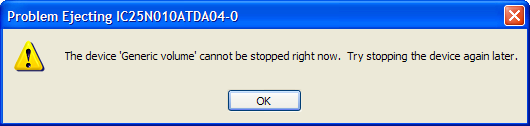
Cannot stop device right now

Whenever I try to use the “Safely remove hardware” option in windows to remove the hard drive installed in the modular bay of my laptop, I get the following message:

As far as I could tell, nothing was actually using the drive. I’m only using it to backup files on at the present time.

I disabled Windows indexing, thinking that a system process had the device in use, but that didn’t make a difference.

So I downloaded Filemon for Windows from http://www.sysinternals.com hoping I would be able to see what file was open on the device.

Well wadda ya know … turns out Norton Utilities “Protected Recycle Bin” had the doggone thing open.

When I turned OFF the Norton extensions on the recycle bin for drive D:, I was able to stop the device and safely eject it.

Please send me the log file

Last week I had an experience with a customer that took me aback.

I was trying to help them diagnose a problem … in order to diagnose this problem I needed to see the log file from a server.

This log file is plain text. It’s readable using notepad, or any other editor that can handle plain text files.

Here’s what the customer did …

  1. Opened the log file with notepad
  2. Did a screen capture (using ALT-PrtScr)
  3. Pasted the screen capture into a word document
  4. Emailed us the word document

Now I understand a certian lack of familiarity with PC’s … but this is kind of silly. Doing a simple file attachment is NOT rocket science.

GMail Invites

I have a bunch of GMail invites available.

If anyone actually reads this, and would like an invite, post a comment with your name & email address and I’ll send you one.

The way Google is giving them out now … I suspect they are just ramping up their rollout.

Pounding streets

They have been resurfacing the street outside my office for the past few weeks … and today they are breaking up the concrete.

To do this, they are using one of those huge pneumatic sledge hammer devices … the kind that lift the weight up and then drop it down to break the pavement.

Unfortunately, this is causing our entire building to shake … which is really distracting and annoying.

I’m kind of worried that something is going to break … like a window.

Must visit Lake Wobegon someday

While I usually don’t comment on politics that often, Ginny found an article by Garrison Keillor that we both found absolutely tremendous.

How did the Party of Lincoln and Liberty transmogrify into the party of Newt Gingrich’s evil spawn and their Etch-A-Sketch president, a dull and rigid man, whose philosophy is a jumble of badly sutured body parts trying to walk?

Suffice it to say … I agree 100% with Garrison on this, and he had stated it quite elegantly and succinctly.

Blast from the past

A recent thread on MIDRANGE-L got people talking about some of the old hardware they had worked on.

I mentioned the fact that, when I was in school, I used to know how to program an IBM 029 card punch.

Ken Shields generously sent me a link to information about the 029 … just in case I need to re-hone my skills.

Dunno if I will really need to bone up on 029 card punch programming … I have enough of a problem just dealing with the differences between Unix and iSeries editors. You wouldn’t belive the number of times I click on the “X” close button on my 5250 emmulator when I’m done editing source in SEU. Heck, occasionally I’ll start editing in ‘Stream of consciousness’ mode, and look up to find a bunch of J’s, K’s, I’s, and L’s in the middle of my seu screen (J, K, I, & L, are the cursor navigation keys in VI, the standard unix editor).

Windows XP Desktop Grid

Note: I found this somewhere on the internet … but I can’t remember where.

Sometimes there just isn’t enough room for the all the text underneath those icons. Or, you maybe you are having some kind of overlapping problem. You can fix this by adjusting the space between your icons.

There is an invisible grid on your desktop the computer uses to place icons and associated text in to. This grid sort of looks like a checker board. You can adjust the size of the boxes. Here’s how:
Right click on any empty spot on your desktop. Click Properties, and then click the appearance tab. Next click the advanced button and you should find yourself in the “Advanced Appearances” window. Click on the pull-down window under “Item” and select “Icon spacing (horizontal). Note there is also an “icon spacing) vertical too. Click on the size arrows to adjust icon size. Do the same with Vertical. You will need to work at this some until you get the size/spacing you want. Click ok.

Note: You may have to uncheck and recheck the “Align to grid” option before your icons will move into place. Here’s how: Right click on any empty spot on your desktop. From the menu select “Arrange icons by” and click on “Align to grid” to uncheck it and then click to option again to recheck it. Once you do that your icons will move to your new grid settings.