Category Archives: Technology

AOL and TOS

The other day, while upgrading SpamAssassin, I was watching the maillog scroll past.

I noticed that AOL rejected some of my mail … indicating a URL that I should visit for information.

Turns out some AOL subscriber had reported mail from my server for TOS violations.

Obviously in the mail log there is not useful information about who did the reporting … so I visited the URL. There was information available on how to sign up to be whitelisted by the AOL mail servers and participate in the TOS ‘feedback’ loop. This is where AOL will send a specific email address (an abuse address, generally) messages that are reported as TOS violations.

So I signed up for this and got confirmation that my servers were accepted.

I figure that the person who is reporting the list messages to TOS just wants to get unsubscribed from the list (and can’t read enough english to notice that unsubscribe instructions are at the bottom of every list message).

So today I got my first feedback loop message.

Unfortunately, there’s no indication in the reported message as to WHO reported it to TOS.
Continue reading
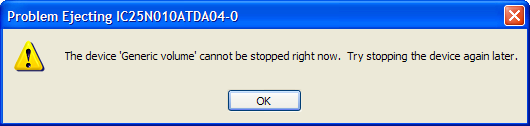
Cannot stop device right now

Whenever I try to use the “Safely remove hardware” option in windows to remove the hard drive installed in the modular bay of my laptop, I get the following message:

As far as I could tell, nothing was actually using the drive. I’m only using it to backup files on at the present time.

I disabled Windows indexing, thinking that a system process had the device in use, but that didn’t make a difference.

So I downloaded Filemon for Windows from http://www.sysinternals.com hoping I would be able to see what file was open on the device.

Well wadda ya know … turns out Norton Utilities “Protected Recycle Bin” had the doggone thing open.

When I turned OFF the Norton extensions on the recycle bin for drive D:, I was able to stop the device and safely eject it.

Please send me the log file

Last week I had an experience with a customer that took me aback.

I was trying to help them diagnose a problem … in order to diagnose this problem I needed to see the log file from a server.

This log file is plain text. It’s readable using notepad, or any other editor that can handle plain text files.

Here’s what the customer did …

  1. Opened the log file with notepad
  2. Did a screen capture (using ALT-PrtScr)
  3. Pasted the screen capture into a word document
  4. Emailed us the word document

Now I understand a certian lack of familiarity with PC’s … but this is kind of silly. Doing a simple file attachment is NOT rocket science.

GMail Invites

I have a bunch of GMail invites available.

If anyone actually reads this, and would like an invite, post a comment with your name & email address and I’ll send you one.

The way Google is giving them out now … I suspect they are just ramping up their rollout.

Blast from the past

A recent thread on MIDRANGE-L got people talking about some of the old hardware they had worked on.

I mentioned the fact that, when I was in school, I used to know how to program an IBM 029 card punch.

Ken Shields generously sent me a link to information about the 029 … just in case I need to re-hone my skills.

Dunno if I will really need to bone up on 029 card punch programming … I have enough of a problem just dealing with the differences between Unix and iSeries editors. You wouldn’t belive the number of times I click on the “X” close button on my 5250 emmulator when I’m done editing source in SEU. Heck, occasionally I’ll start editing in ‘Stream of consciousness’ mode, and look up to find a bunch of J’s, K’s, I’s, and L’s in the middle of my seu screen (J, K, I, & L, are the cursor navigation keys in VI, the standard unix editor).

Windows XP Desktop Grid

Note: I found this somewhere on the internet … but I can’t remember where.

Sometimes there just isn’t enough room for the all the text underneath those icons. Or, you maybe you are having some kind of overlapping problem. You can fix this by adjusting the space between your icons.

There is an invisible grid on your desktop the computer uses to place icons and associated text in to. This grid sort of looks like a checker board. You can adjust the size of the boxes. Here’s how:
Right click on any empty spot on your desktop. Click Properties, and then click the appearance tab. Next click the advanced button and you should find yourself in the “Advanced Appearances” window. Click on the pull-down window under “Item” and select “Icon spacing (horizontal). Note there is also an “icon spacing) vertical too. Click on the size arrows to adjust icon size. Do the same with Vertical. You will need to work at this some until you get the size/spacing you want. Click ok.

Note: You may have to uncheck and recheck the “Align to grid” option before your icons will move into place. Here’s how: Right click on any empty spot on your desktop. From the menu select “Arrange icons by” and click on “Align to grid” to uncheck it and then click to option again to recheck it. Once you do that your icons will move to your new grid settings.

Internet enabled thermostat

EnGadget has a piece on a cool Internet enabled thermostat.

I gotta say … this item is something I would really like to have. I even think I could drop the wire down the wall from our thermostat pretty easily.

I wonder how long it will be until you have to use a class B subnet for your house?

Hmmm … what other ‘internet’ enabled devices are available for home automation?

Update 11/29/04 – I heard back from the company manufacturing this unit … the list price is going to be $400 each. As cool as it would be (ha, I made a pun) , I think the price is far out of reach.